
A compliant landing page rests on five pillars: transparent notice-at-collection, lawful consent for nonessential tracking, accessible design, truthful and substantiated claims, and basic data security. This guide walks through GDPR and CCPA/CPRA obligations, cookie and consent UX, WCAG-based accessibility fixes, FTC substantiation rules, and the monitoring workflow that keeps a landing page audit ready. Tools like Scancompliant show how pre-publication scanning can catch problems before legal ever sees them.
TL;DR:
- Landing pages must have precise notice-at-collection, clear consent mechanisms, and accessible design, all tailored to specific data collection and tracking elements.
- GDPR applies immediately when EU residents are targeted or monitored, while CCPA/CPRA depend on California residency and business size thresholds, requiring different disclosures.
- Consent must be affirmative, granular, and reversible, with tools like consent banners and CMPs ensuring compliance, especially for analytics and advertising cookies.
- Automated scanning tools can identify risky language, tracking scripts, and accessibility issues before publication, streamlining legal review and maintaining audit records.
- Incorporating early compliance checks and reusable legal templates reduces launch delays and ensures ongoing monitoring through scheduled audits and post-launch verifications.
Table of Contents
- What Counts as a Landing Page Under Compliance Rules
- GDPR and CCPA/CPRA: When Each Law Actually Applies
- Building Consent and Cookie Controls That Hold Up
- Privacy Notices and Notice-at-Collection: What Goes Where
- Accessibility Checklist: WCAG and ADA for Landing Pages
- FTC Rules for Marketing Claims and Testimonials
- Form Design: Collecting Less and Protecting More
- The Pre-Launch and Post-Launch Compliance Checklist
- How Automated Scanning Fits Into the Review Process
- Compliance Doesn’t Have to Slow Marketing Down
- Scanning Your Landing Pages Before They Go Live
- Where to Verify These Rules Directly
- Sources
- FAQ
What Counts as a Landing Page Under Compliance Rules
Any standalone page built to convert traffic from an ad, email, or social post counts as a landing page, whether it is selling a supplement, gating a white paper, or collecting emails for a webinar. That includes squeeze pages with a single form field, quiz funnels that gate results behind an email address, and “coming soon” pages running paid traffic.
The obligations attach to specific elements, not the page as a whole. A form field asking for a phone number creates a data collection obligation. A tracking pixel from a paid social platform creates a consent obligation. A headline claiming a product “cures” or “eliminates” a condition creates an FTC substantiation obligation. A gated PDF download creates both a privacy notice obligation and, often, a marketing consent question.
Here’s the rough map compliance teams should keep in mind: a lead-gen form triggers notice-at-collection and data minimization rules; a retargeting pixel triggers consent requirements before it fires; a testimonial or before/after image triggers endorsement disclosure rules; and a checkout or payment field triggers data security obligations, including encryption and access controls. Treat the page as a bundle of individual risk points rather than one document, and the rest of this guide gets a lot easier to apply.
GDPR and CCPA/CPRA: When Each Law Actually Applies
GDPR applies the moment a landing page targets or monitors people in the EU, regardless of where the business is headquartered. Running EU-targeted ads, offering a page in a European language, or shipping product to EU addresses can all trigger it. For forms and tracking, the practical question is whether the business relies on consent or legitimate interest as the legal basis. Consent is required for nonessential tracking and marketing emails; legitimate interest can sometimes cover basic security logging, but it cannot cover ad retargeting pixels.
CCPA and its update, CPRA, work differently. They apply based on California residency and business size thresholds, not targeting intent. A landing page collecting data from California visitors needs a notice at collection, visible at or before the point of data gathering, describing what is collected and why. It also needs a functioning mechanism for opt-out of sale or sharing, commonly a “Do Not Sell or Share My Personal Information” link, and a clear path for consumers to submit data subject requests like access or deletion.
Practical patterns that work for both laws on the same page:
- Geo-detect the visitor and serve a GDPR-style consent banner to EU traffic while showing a CCPA-style notice link to California traffic.
- Keep the minimum disclosure visible without a click: what’s collected, why, and who to contact.
- Route both consent banners and opt-out links to the same backend so consent records and request logs land in one system instead of two.
- Never assume a small business exemption applies without checking the current CPRA revenue and data-volume thresholds, since the numbers shift and a landing page built for one campaign can outlive the assumption.
Teams running multi-market campaigns often build one banner logic tree with two or three regional variants rather than maintaining separate pages, which cuts the chance of a stale disclosure sitting unnoticed on an old campaign URL.
Building Consent and Cookie Controls That Hold Up
Consent has to be affirmative, specific, and reversible. That rules out pre-ticked boxes, bundled “accept all” buttons with no granular option, and cookie banners that keep tracking regardless of what the visitor clicks. The FTC’s advertising guidance reinforces the same transparency principle that underlies GDPR consent UX: if a business represents that a choice exists, that choice has to be real.
A workable consent setup includes:
- A banner that blocks nonessential scripts (ad pixels, analytics, retargeting tags) until the visitor makes a choice, not just cosmetically hides the banner after any click.
- Purpose-based toggles, so a visitor can accept analytics but decline advertising cookies separately.
- A visible, one-click way to withdraw consent later, not just a link buried in a privacy policy.
- A consent management platform (CMP) that logs timestamped consent records in an exportable format, since regulators and internal audits both eventually ask “prove it.”
For Google Analytics, Meta Pixel, or any ad platform tag, the fix is technical, not cosmetic: fire nothing until the CMP confirms consent, and use consent mode settings that downgrade to cookieless pings when a visitor declines, rather than firing the full tag anyway.
Pro Tip: Test your consent banner with scripts open in a network tab. If analytics or ad pixels fire before a visitor clicks anything, the banner is decorative, not functional, and that gap is exactly what regulators and platform auditors look for first.
Privacy Notices and Notice-at-Collection: What Goes Where
A landing page privacy policy needs to state, in plain language, what categories of data get collected, why, how long it’s kept, who it’s shared with, and how visitors can exercise their rights. Burying this in a generic company-wide policy that never mentions the specific campaign or promotion is a common gap auditors flag.
- Write the notice-at-collection text at the field level. A short line under an email field, like “We’ll use this to send you the guide and occasional related offers. Unsubscribe anytime,” does more compliance work than a link to a 4,000-word policy.
- Keep the full privacy policy one click away, linked in the footer and near any form, listing data categories, retention periods, third-party processors, and a contact method for rights requests.
- Add specific terms and conditions for anything with a prize, contest, or paid offer, covering eligibility, how winners are chosen, and any material restrictions, since promotional pages carry separate legal exposure from ordinary lead capture.
Retention language matters more than most teams realize. Saying “we keep your data as long as needed for the stated purpose, and delete it within 24 months of your last interaction” gives regulators and visitors something concrete, instead of the vague “as long as necessary” phrasing that satisfies no one during a review.
Accessibility Checklist: WCAG and ADA for Landing Pages
The Americans with Disabilities Act has been interpreted by courts and enforcement guidance to require that electronic information, including marketing landing pages, meet standards detailed in this Regulatory Compliant Laboratory for CROs: Evaluation Guide, ensuring accessibility to people with disabilities. The technical benchmark regulators and courts point to is the Web Content Accessibility Guidelines, currently at version 2.2.
The checkpoints that catch the most landing pages:
- Alt text on every meaningful image, including hero images and product shots, not just decorative graphics that can be marked as null alt text.
- Visible keyboard focus indicators on buttons, form fields, and links, so a visitor tabbing through the page can always see where they are.
- Color contrast of at least 4.5:1 for normal text against its background, which trips up a lot of pastel-on-white CTA buttons.
- Labeled form fields, with actual
<label>tags tied to inputs, not just placeholder text that disappears once someone starts typing. - A skip-to-content link for pages with long navigation or hero sections before the main form.
The most common landing page failure is a CTA button styled as a colored div with no semantic role, which a screen reader announces as nothing at all. The fix is a real <button> or <a> element with descriptive text, not “click here.”
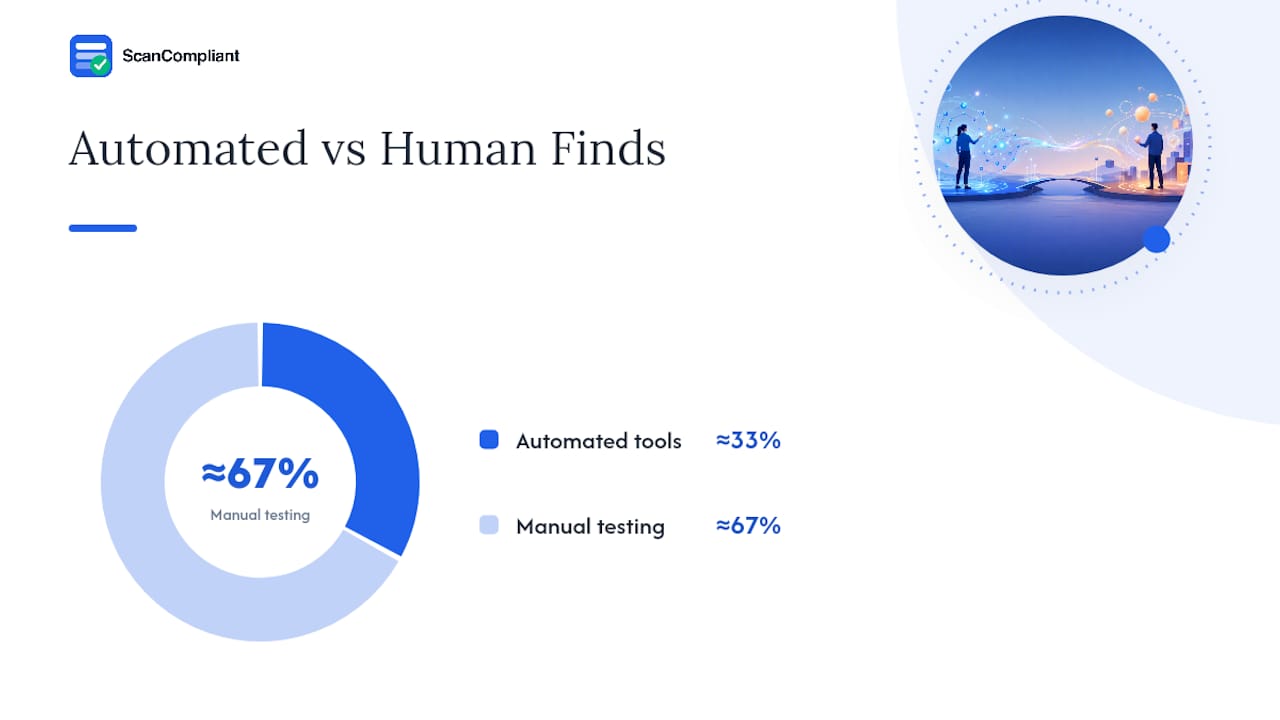
Pro Tip: Run an automated scanner first, but always follow it with a manual pass: tab through the entire page using only your keyboard, then run it once with a screen reader like VoiceOver or NVDA. Automated tools catch roughly a third of real accessibility issues; the rest only show up when a human tries to actually use the page.
FTC Rules for Marketing Claims and Testimonials
The FTC requires that advertising claims be truthful and backed by evidence before they run, not after a complaint arrives. Any claim likely to influence a purchase decision, whether it’s a health benefit, a performance number, or a comparison to a competitor, needs substantiation that existed before the claim was published.
Claim types that draw the most scrutiny include specific numeric results (“lose 10 pounds in two weeks”), health or medical benefit language, and comparative claims against named or implied competitors. Reliable evidence generally means clinical data, controlled testing, or documented expert review, not a single satisfied customer or an internal anecdote.
Testimonials and endorsements carry their own rules:
- Any material connection between the endorser and the brand, paid partnership, free product, affiliate commission, has to be disclosed clearly and near the claim itself, not in a footer.
- Results shown in a testimonial need to reflect what typical customers can expect, or the page needs a disclaimer stating results aren’t typical.
- Before/after images require the same substantiation standard as a written claim, since a visual can imply a result just as strongly as text.
The practical fix is documentation discipline: keep a dated file connecting every substantive claim on the page to its supporting evidence, and retain it as part of the content review audit trail rather than scattered across old email threads. When an inquiry does happen, having that evidence already organized cuts response time from weeks to days.
Form Design: Collecting Less and Protecting More
The safest data field is the one that was never added to the form. Marketing teams routinely over-collect: asking for a full mailing address when only a ZIP code is needed for shipping estimates, or requesting a phone number “just in case” when the campaign never calls leads.
- Audit every field against its actual use. If a field’s data never gets used in the next 90 days of the campaign, remove it. A shorter form also converts better, so minimization and marketing performance usually point the same direction.
- Mark optional fields as optional, visibly, and never require a field that isn’t functionally necessary to complete the transaction or request.
- Avoid collecting special categories of data, health conditions, race, sexual orientation, unless the offer genuinely requires it, and when it does, add extra consent language and stronger field-level encryption rather than treating it like a standard text input.
Retention policy belongs in plain language near the form, not just in the master privacy policy: something like “Form data is retained for 18 months after your last interaction with us, then deleted.” That single sentence does more to satisfy both CCPA notice requirements and general visitor trust than a paragraph of legal boilerplate ever will. On the security side, encrypt data in transit and at rest, and restrict internal access to the fields that actually need it, a pattern documented in SOC frameworks that most compliance teams already reference for vendor due diligence.
The Pre-Launch and Post-Launch Compliance Checklist
Compliance work on a landing page splits cleanly into what happens before it goes live and what happens after, and treating both as one-time tasks is where most teams fall behind.
Pre-launch, roughly in order:
- Confirm the privacy policy link and notice-at-collection text are live and field-specific.
- Verify the consent banner blocks nonessential scripts until a choice is made.
- Run an accessibility sweep: automated scan plus a manual keyboard pass.
- Confirm every substantive claim on the page has documented substantiation on file.
- Verify SSL/TLS is active and form data encrypts on submission.
- Strip the form down to only the fields the campaign actually needs.
Post-launch, on a recurring basis:
- Export and spot-check consent records monthly to confirm the CMP is logging correctly.
- Re-run the accessibility scan after any design update, not just at launch.
- Confirm data subject requests (access, deletion, opt-out) get routed and answered within the legal response window.
- Check ad platform policy notices quarterly, since destination experience rules change and can trigger ad rejections without warning.
- Schedule a full compliance audit every quarter, not just when a campaign launches.
A simple RACI split works well here: marketing owns copy and design, legal or compliance owns claim substantiation and privacy language, and IT or engineering owns consent blocking and encryption. Assign one person as the final sign-off before anything ships, because shared ownership without a single accountable reviewer is how gaps slip through.
Pro Tip: Build a pre-approved copy block library, disclosure language, testimonial disclaimers, notice-at-collection sentences, that marketing can drop into new pages without waiting on legal review each time. It cuts launch delays dramatically while keeping the wording consistent.
How Automated Scanning Fits Into the Review Process
Manual legal review catches the claims a lawyer knows to look for. It’s slower at catching the ones buried in a headline, a chat widget script, or a hidden pixel that a reviewer never scrolled down far enough to see. Automated pre-publication scanning tools fill that specific gap by checking every word and script against a database of known risk terms before the page ever goes live.
These tools typically flag risky claim language (“cures,” “guaranteed,” “clinically proven” without backup), missing disclosures on testimonials, pixel and tracking script usage that hasn’t cleared consent review, and basic accessibility flags like missing alt text or poor contrast, all in one pass.
The value shows up in the workflow, not just the findings:
- Scans run in minutes, so marketing gets a prioritized list of issues before a page ever reaches legal’s desk, cutting the back-and-forth that normally eats days.
- Every scan produces a timestamped record, which becomes the audit trail a compliance team can produce if a regulator or ad platform ever asks how a claim was reviewed.
- Human reviewers still make the final call on judgment questions, like whether a claim’s substantiation is strong enough. The scanner’s job is making sure nothing risky reaches that stage unflagged.
Automated scanning tools run against databases of risk terms to catch subtle claim language that a rushed human reviewer, staring down a launch deadline, can easily miss. That combination of speed and documentation is what turns compliance from a bottleneck into a normal step in the pre-publish workflow.
Compliance Doesn’t Have to Slow Marketing Down
The instinct to treat compliance review as a final gate before launch is exactly backwards. Every extra day a claim sits in someone’s inbox waiting for a manual read is a day a campaign isn’t running, and most of that delay comes from process, not from the actual complexity of the regulation.
The fix isn’t skipping review. It’s moving it earlier and making it faster. A pre-approved copy library for disclosures and testimonials removes the guesswork on language that gets reused constantly. Clear evidence requirements, a one-page rule of “if you can’t point to the file backing this claim, don’t publish it yet,” stop the scramble that happens when a claim gets questioned after launch instead of before.
Treat each new landing page as a small experiment in what breaks: run the checklist, log what got flagged, and adjust the templates. Teams that schedule audits quarterly, rather than reacting only when something goes wrong, spend far less time firefighting.
— Compliant Team
Scanning Your Landing Pages Before They Go Live
Legal review that takes two weeks doesn’t work when a campaign launches in two days. Certain platforms close that gap by scanning landing page copy, forms, and tracking scripts against databases of risk terms, returning prioritized findings in minutes instead of days.
Some platforms support marketing teams by checking claim substantiation, flagging ad platform policy risks, and providing documented review trails before an inquiry happens. Every scan produces a timestamped record, so when a regulator, ad platform, or internal audit asks how a claim was reviewed, the answer is already on file instead of buried in an email thread.
If your team is publishing landing pages faster than legal can manually review them, start a trial on the Scancompliant landing page and run your next page through it before it goes live.
Where to Verify These Rules Directly
Confirm jurisdiction-specific details at the source: ADA.gov for accessibility obligations, FTC advertising guidance for claim substantiation, WCAG for technical accessibility standards, and Microsoft Advertising’s policy help center for destination experience rules. Regulations update; primary sources don’t lag behind the way blog posts do.
This article is general information, not a substitute for advice from a qualified lawyer. Consult a qualified legal professional about your own circumstances before acting on anything here.
Sources
- Web Content Accessibility Guidelines (WCAG) — W3C
- Advertising and marketing — Federal Trade Commission (FTC)
- Ada
- Microsoft Advertising help — destination experience and policies
FAQ
What Are the Top Compliance Regulations for Landing Pages?
The core five are GDPR, CCPA/CPRA, the ADA/WCAG accessibility standards, FTC advertising rules, and general data security requirements like encryption and access controls, each covering a different obligation from consent to truthful claims.
What Information Legally Has to Be on a Landing Page?
At minimum: a privacy policy link, a notice-at-collection statement near any data-gathering form, accurate and substantiated marketing claims, and a functioning cookie consent mechanism if nonessential tracking scripts run.
What Are the Three Types of Compliance Most Relevant to Marketing Pages?
Legal compliance (privacy law and advertising law), technical compliance (accessibility standards and data security controls), and platform compliance (ad network destination and disclosure policies) cover the three practical categories a landing page has to satisfy.
Do I Need a Privacy Policy for a Simple Lead-Gen Landing Page?
Yes. Any page that collects personal data, even just an email address, needs a linked privacy policy and, in most cases, field-level notice-at-collection language explaining how that data will be used.
How Can I Catch Compliance Issues Before a Landing Page Goes Live?
Combine a manual pre-launch checklist covering privacy, accessibility, and claims with an automated scanning tool like Scancompliant, which checks copy and tracking scripts against a risk-term database and produces a documented review trail in minutes.