
Yes. If your telehealth or DTC health site runs Google Analytics, Meta Pixel, or similar trackers on pages tied to health-seeking activity, you likely have HIPAA exposure right now. The Office for Civil Rights (OCR) treats tracking data as a potential disclosure of protected health information (PHI) when it’s connected to a user’s health condition, treatment, or intent to seek care, not just when it includes a diagnosis code.
The riskiest spots are predictable:
- Authenticated patient portal pages, by default, since anything a logged-in user does there is presumed health-related
- Appointment booking and scheduling flows
- Symptom checkers or intake questionnaires
- Booking confirmation pages that reveal a provider specialty or visit reason
Your first move: pause or block third-party trackers on every page in that category and start a page-by-page audit before you do anything else. Everything below explains why, and how to do it right.
Key Takeaways
Health-context pages carry real HIPAA exposure through analytics tracking, and the fix requires both a technical audit and documented decision-making, not one or the other.
| Point | Details |
|---|---|
| Apply the intent test | Ask whether a page visit reveals health-seeking intent, not just whether it collects a name. |
| Audit before you fix | Map every tracker’s hosts and parameters using devtools and tag manager records before removing anything. |
| Consent isn’t authorization | Cookie banners never substitute for a signed BAA when sharing data with ad or analytics vendors. |
| Document every decision | Preserve request logs, tag change history, and BAAs in case OCR or breach-notification review ever requires them. |
| Cover content risk too | Scancompliant scans marketing copy for FDA/FTC risk language, adding a documented trail alongside your tracking fixes. |
Table of Contents
- Google Analytics HIPAA Compliance: The OCR Test You Need to Apply
- How to Audit Every Tracker on Your Site
- What to Do Once You’ve Found a Problem Tracker
- Building a 90-Day Remediation Timeline
- Where Content Risk Fits Into the Bigger Picture
- Why Most Compliance Teams Are Solving the Wrong Problem First
- How to Evaluate ScanCompliant for Your Compliance Program
- Sources
Google Analytics HIPAA Compliance: The OCR Test You Need to Apply
OCR’s March 18, 2024 guidance update didn’t ban analytics tools outright, but it narrowed the safe harbor considerably. The central question isn’t “does this page collect a Social Security number?” It’s whether the visit itself reveals something about a person’s past, present, or future health, health care, or payment for health care. A visit to your general “About Us” page tells a tracker nothing meaningful. A visit to “Book a Consultation for Anxiety Treatment” tells it plenty, even without a name attached.
That distinction between authenticated and unauthenticated pages matters, but it’s not a clean line. Authenticated portal pages are treated as inherently PHI-adjacent because the user is already identified. Unauthenticated pages get evaluated on user intent: was this person searching for information generally, or taking an action that signals they’re seeking care for themselves?
HIPAA recognizes 18 identifiers that, combined with health information, create PHI. Trackers routinely capture several of them without anyone intending it:
- IP addresses (logged automatically by nearly every analytics platform)
- Device identifiers and advertising IDs
- Email addresses or account identifiers passed through URL parameters or form autofill
- Full URLs that contain a condition name, medication, or appointment type in the query string
Legal analysts at Holland & Knight point out that OCR’s guidance is deliberately broad and puts the burden on the regulated entity to make the health-related determination itself. That ambiguity is exactly why many organizations default to removing tracking from any page with plausible health context rather than arguing the finer points with a regulator later. OCR has also made clear that tracking technology is a Security Rule enforcement priority, meaning your risk analysis documentation matters as much as the technical fix itself.
How to Audit Every Tracker on Your Site
Start with a map of health-context pages, ranked by exposure. Appointment scheduling and symptom-intake flows come first because they combine identifiable users with explicit health signals. Provider search pages and booking confirmations come next, since they often reveal specialty or visit type even to anonymous visitors. Patient portal landing pages round out the priority list.
Once you have that map, work through the technical audit in order:
- Open browser devtools and watch the Network tab while you click through each priority page as an anonymous user, then again as a logged-in one.
- Pull every tag from your tag manager (Google Tag Manager, Segment, or similar) and list which third-party hosts fire on each page. Watch specifically for calls to google-analytics.com, googletagmanager.com, connect.facebook.net, analytics.tiktok.com, and linkedin.com.
- Inspect the event parameters each tracker sends. Look for query strings, hashed emails, form field values, or page titles that include a condition, medication, or procedure name.
- Cross-reference every third-party host against your vendor contracts to confirm whether a signed Business Associate Agreement (BAA) exists.
Document everything as you go: which requests fired, what parameters they carried, who originally added that tag, and when. Practical audits from privacy practitioners consistently find that marketing teams added pixels months or years earlier for a campaign that ended long ago, with nobody left who remembers why they’re still firing.
Pro Tip: Screenshot your Network tab results for each page before you make any changes. If OCR or a plaintiff’s attorney ever asks what was happening on your site, “we fixed it” isn’t a defense without proof of the original state.
What to Do Once You’ve Found a Problem Tracker
The fastest, most conservative fix is also the simplest one: pull third-party trackers off any page that touched your priority list until you’ve confirmed, in writing, that no PHI left your server. That’s not a permanent answer for most marketing teams, since it kills conversion attribution on exactly the pages that matter most for growth. But it stops the bleeding while you build something more durable.
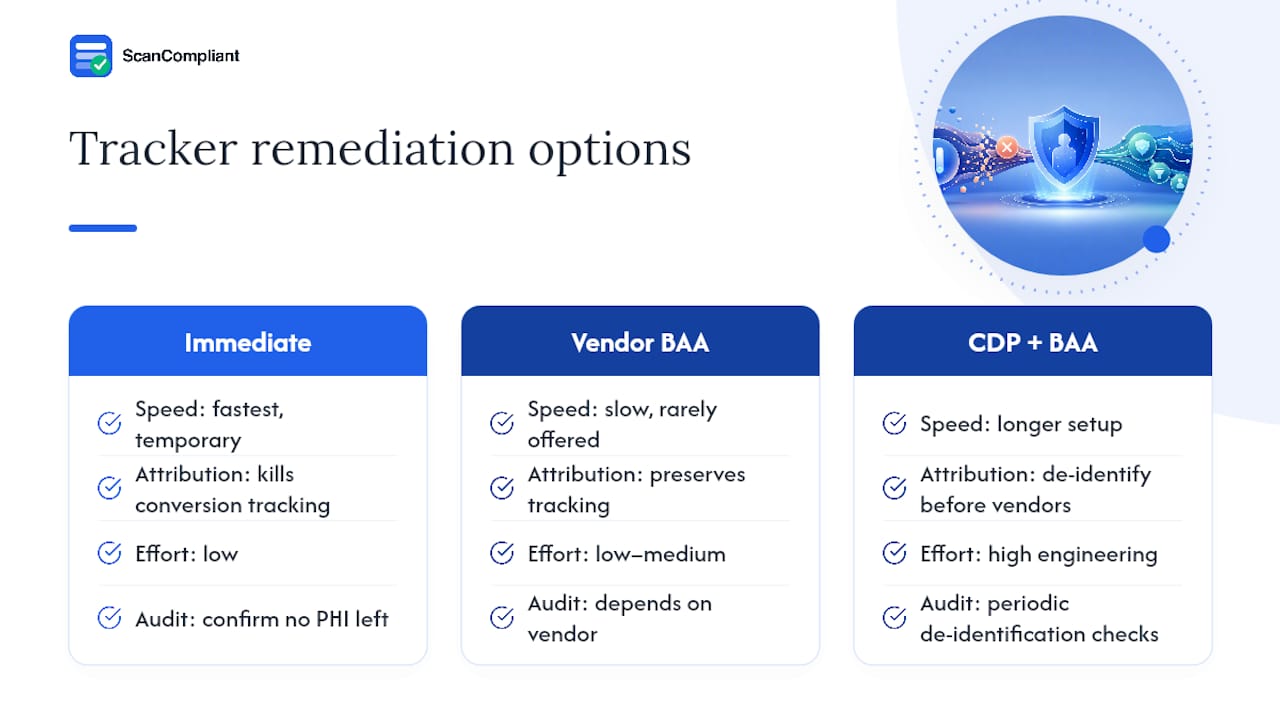
For teams that need tracking data to survive, OCR’s guidance leaves two structural paths open. One is a signed BAA with the tracking vendor itself, which very few ad platforms will offer. The other, outlined in analysis from WSGR, is routing data through a Customer Data Platform (CDP) under a BAA, which strips identifiers before anything reaches a vendor that won’t sign one. That path works, but it requires real engineering investment and periodic audits to confirm the de-identification process still holds up as your site changes.
Server-side analytics and self-hosted tools reduce third-party disclosure risk because data passes through your own infrastructure first, giving you a chokepoint to filter identifiers before anything leaves your servers. Attribution doesn’t have to disappear entirely: UTM parameters and self-reported “how did you hear about us” fields can recover a meaningful share of campaign performance without a single third-party cookie.
One point regulated entities get wrong constantly:
A cookie consent banner is not a HIPAA authorization. Clicking “Accept” on a privacy popup does not give you legal cover to disclose PHI to Google, Meta, or any other vendor that hasn’t signed a BAA.
Foley & Lardner’s analysis confirms this directly: consent management platforms handle a different legal requirement (state privacy laws) and do nothing to satisfy HIPAA’s disclosure rules. If your privacy notice language implies otherwise, that’s a separate compliance gap worth fixing on its own.
Building a 90-Day Remediation Timeline
This isn’t a job for one department working alone. Privacy counsel needs to sign off on the risk determination, security has to validate the technical fix, engineering implements it, and marketing needs a seat at the table because they’re the ones who’ll feel the attribution loss.
A workable rapid-response sequence looks like this:
- First 72 hours: pause or block third-party trackers on every priority page and complete the technical mapping described above.
- Weeks one and two: implement mitigations, whether that’s tracker removal, a de-identification pipeline, or a server-side setup, and update vendor BAAs where needed.
- Following 90 days: monitor logs and tag changes before considering any re-enablement of removed trackers, and reassess quarterly after that.
Preserve everything from this process: request logs from your audit, tag change history from your tag manager, signed BAAs, internal decision memos explaining why you chose one mitigation path over another, and your findings on whether any disclosure requires breach notification. If OCR ever opens an inquiry, that paper trail is the difference between a defensible good-faith process and a costly finding of willful neglect.
Where Content Risk Fits Into the Bigger Picture
Fixing your trackers solves the technical half of the problem. The other half lives in what your marketing team actually publishes, because the same health-context pages that trip up analytics compliance are often the ones making implied efficacy claims or soft medical promises that create separate FDA and FTC exposure.
Scancompliant scans marketing content, landing pages, and social copy against a database of more than 1,000 risk terms, flagging risky language before it publishes rather than after a regulator finds it. The platform has already supported over 200 brands through this process, and it builds a documented review trail as it goes, which matters as much for content risk as your tracker logs do for tracking risk.

Teams typically run it as a parallel track to the technical audit: while engineering maps trackers, marketing runs new landing pages and campaign copy through a compliance scan before anything ships, with findings prioritized so nothing urgent slips through a busy review cycle.
Why Most Compliance Teams Are Solving the Wrong Problem First
Most of the advice circulating since March 2024 treats this as a pure engineering fix: rip out the pixel, install a server-side proxy, move on. That’s necessary but incomplete. OCR’s guidance turns on user intent, and intent is a judgment call your legal and marketing teams have to make together, page by page. A pure engineering team auditing tags in isolation will miss half the risky pages because they’re not the ones who understand which landing page copy implies a health-seeking visit.
The conventional advice also underweights documentation. Teams rush to fix the technical problem and skip writing down why they made each call. If OCR ever asks, “we removed it” without a dated decision memo looks like a scramble, not a process.
What should compliance teams prioritize first? Not the fanciest de-identification pipeline. Start with the inventory, because you cannot assess risk on trackers you don’t know exist. Then build the habit of documenting every decision as you go, not after the fact. The technical fix is often the easy part once you know what you’re fixing.
— Compliant Team
How to Evaluate ScanCompliant for Your Compliance Program
Tracker audits handle the data side of HIPAA risk. The content your marketing team publishes around those same pages, headlines, ad copy, landing page claims, is a separate exposure that a firewall rule can’t fix. Scancompliant is built specifically for that gap: it scans your site, social channels, and product listings for language that implies medical claims or crosses FDA and FTC lines, and flags it before publication instead of after a complaint.

If you’re evaluating tools alongside your tracker remediation project, start with a product trial to see how it flags language your team might read past on a busy day. Procurement and security teams running due diligence can review the security and data policy directly, and the pricing page breaks down tiers for teams of different sizes, including agency workspaces managing multiple brands. Given that you’re already documenting tracker decisions for OCR, adding a documented content review trail from the same evaluation period is a natural next step, not an extra project.
Sources
- HHS OCR updated guidance on online tracking technologies
- OCR Updates Its Website Tracking Tool Guidance | Holland & Knight
- OCR at HHS updates guidance on use of online tracking technology by HIPAA-regulated entities | WSGR Data Advisor
- Is your telehealth app leaking PHI through tracking pixels? — Comply Code
This article is general information, not a substitute for advice from a qualified doctor. Consult a qualified healthcare professional about your own circumstances before acting on anything here.
Recommended
- GLP-1 Marketing Compliance Scanner — Scan Your GLP-1 Website Before the FDA Does | ScanCompliant
- Risk-Prioritized Compliance for Healthcare Marketers: 2026 Guide – scancompliant.com
- How Content Compliance Audits Work for Healthcare Teams – scancompliant.com
- Health Content Liability for Telehealth and DTC Brands – scancompliant.com